Physical parts burn out when you wire them backward. Replacing damaged microcontrollers costs money and halts your learning process immediately. Electronics educational computer games solve this physical limitation. You test your ideas safely on a digital screen before touching real wires. These programs let you drop components onto a virtual desk, wire them together, and simulate the exact flow of electricity without any risk of fire or melted plastic.
Simulating Breadboards Before Buying Hardware
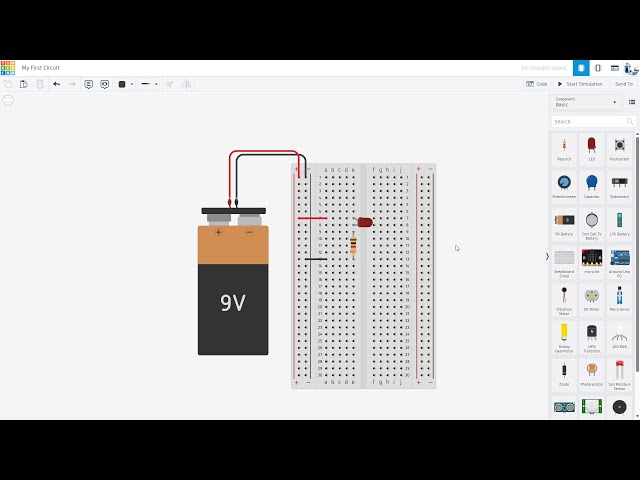
Testing a theory requires parts you might not own yet. Buying every single sensor or microchip quickly drains your budget. A virtual breadboard environment gives you an infinite supply of digital components for free. You drag resistors, LEDs, and batteries onto your screen to build complete layouts. The software calculates the exact voltage and current running through your virtual wires. If you forget to add a resistor, the program simply shows a cracked LED icon instead of creating real smoke in your room.
Practicing in this digital space builds massive confidence for new makers. You perfect your wiring paths on the screen and then recreate that exact same layout using your physical hands-on kits and builds. This two-step process stops you from making expensive physical mistakes at your workbench.
Learning Logic Through Puzzle Mechanics
Gamifying electrical engineering turns dry theory into an engaging challenge. Several modern video games disguise complex logic gates and microchip design as simple puzzles. You start by connecting basic switches to turn on a virtual light. The game slowly introduces AND gates, OR gates, and memory chips. You combine these basic parts to solve progressively harder levels. You learn how computers process math at a hardware level by playing these titles.
| Program | Core Mechanic | Learning Focus |
| Tinkercad Circuits | Drag and drop breadboarding | Basic wiring and beginner coding |
| Turing Complete | Puzzle solving with logic gates | Computer architecture and binary math |
| Falstad Simulator | 2D schematic drawing | Visualizing current flow and waveforms |
Writing Code in a Virtual Environment
Programming physical microcontrollers requires a flawless circuit layout. A mistake in your wiring makes perfect code look broken. Digital simulators isolate your programming errors from your hardware mistakes. You type your code directly into the browser and hit the play button. The virtual board executes your commands exactly as a real chip would.
Reading a structured digital logic tutorial shows you how to translate these virtual software states into physical hardware actions. You test complex robotic timing loops in the software to confirm the math works. You transfer that confirmed code to your physical desk only after the digital test succeeds.
Bringing Digital Designs to the Physical Desk
Computer programs provide a flawless testing ground. Real wires behave differently. Real breadboards have loose clips. Batteries drain slowly and change your voltage readings over time. You use digital tools to verify your theories, but you must always return to your physical workbench to finish the project. The combination of digital planning and physical building creates a highly capable electronics maker ready to solve real mechanical problems.