Teaching hardware logic becomes much easier when the results physically move across the table. Blinking lights teach fundamental electrical rules, but robotics projects for kids turn abstract electrical loops into kinetic movement. You combine basic circuits with mechanical parts, forcing young builders to solve physical problems. They learn how to balance weight, route wires safely away from spinning axles, and manage heavy energy demands without damaging their components.
Starting With Simple Bristlebots
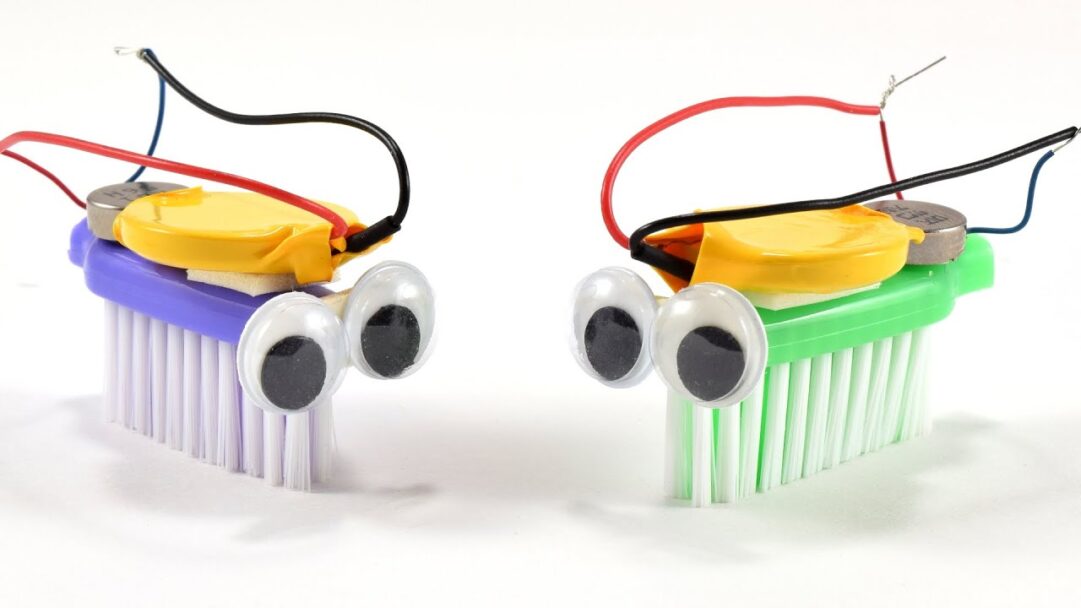
The earliest mechanical builds require zero programming. A bristlebot uses a tiny vibrating motor attached to the head of a standard toothbrush. You connect a small coin cell battery directly to the motor leads. The offset weight inside the motor causes the entire assembly to shake rapidly, pushing the plastic bristles across a flat surface. This project teaches the absolute basics of a closed electrical loop while introducing kinetic motion.
Reading a reliable bristlebot construction guide helps you source the right vibrating motors and balance the battery weight so the machine drives straight instead of spinning in tight circles. The builder learns that physical placement matters just as much as accurate electrical connections.
Building a Light-Following Rover
Once the student grasps simple loops, they transition to environmental sensors. A light-following rover uses two photoresistors to act as primitive eyes. You wire these light sensors to a simple motor controller chip using a breadboard. When you shine a flashlight on the right sensor, the resistance drops, allowing more current to reach the left wheel. This pushes the machine toward the light source.
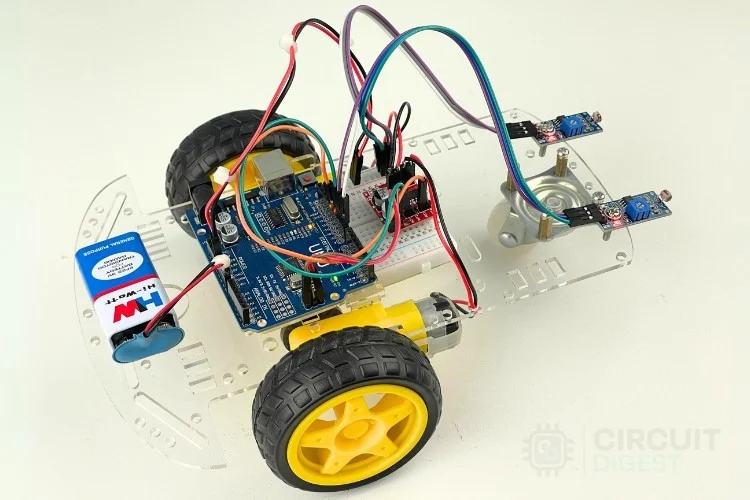
This configuration introduces analog sensing and voltage dividers without requiring a complex computer chip. You find this exact hardware progression in many standard hands-on kits and builds designed for early classroom environments. The student sees exactly how physical environmental inputs directly control mechanical outputs.
| Component | Mechanical Function | Educational Value |
| Vibrating Motor | Creates kinetic shaking | Teaches basic closed loops and weight balance |
| Photoresistor | Changes resistance based on light | Introduces analog environmental sensing |
| Geared DC Motor | Drives heavy plastic wheels | Shows how gearboxes trade speed for torque |
Adding a Brain for Obstacle Avoidance
Remote control cars require constant human input. True robotics rely on autonomous decision-making. You upgrade a basic chassis by adding a programmable microcontroller and an ultrasonic distance sensor. This specific sensor sends out high-frequency sound waves and measures exactly how long the echo takes to return to the board.
The code reads this returning sound wave and calculates the exact distance to the nearest wall. If the wall sits closer than ten centimeters, the microcontroller commands the wheels to stop and reverse immediately. Reviewing a practical ultrasonic sensor tutorial shows you how to wire the trigger and echo pins correctly. The builder learns to translate physical distance into math, and then translate that math back into a physical steering command.
Managing Electricity for Moving Parts
Adding motors introduces a severe electrical problem. Motors pull a massive amount of current compared to a tiny LED. If you run heavy motors from the exact same battery running the delicate microchip, the sudden voltage drain causes the brain board to shut down entirely and reset the code.
You fix this problem by separating the battery supplies. You give the microcontroller its own small energy source and route a much larger battery pack directly to the motor driver chip. Studying standard robotics voltage management teaches young makers how to protect sensitive logic components from heavy mechanical current spikes. They learn to treat the machine as two separate systems communicating with each other safely.